Using the Traefik Ingress Controller Addon
Overview
Traefik is an HTTP reverse proxy and ingress controller designed to route incoming traffic to backend services. The minikube Traefik addon installs Traefik via its official Helm chart into the kube-system namespace.
Prerequisites
- Minikube v1.39.0 or higher
- kubectl
Enabling the Addon
minikube addons enable traefik
! traefik is a 3rd party addon and is not maintained or verified by minikube maintainers, enable at your own risk.
* traefik is maintained by 3rd party (Traefik Labs) for any concerns contact traefik on GitHub.
* Verifying traefik addon...
* To open the Traefik dashboard:

	minikube addons open traefik

    For more information see https://minikube.sigs.k8s.io/docs/handbook/addons/traefik

* The 'traefik' addon is enabled
Accessing the Traefik Dashboard
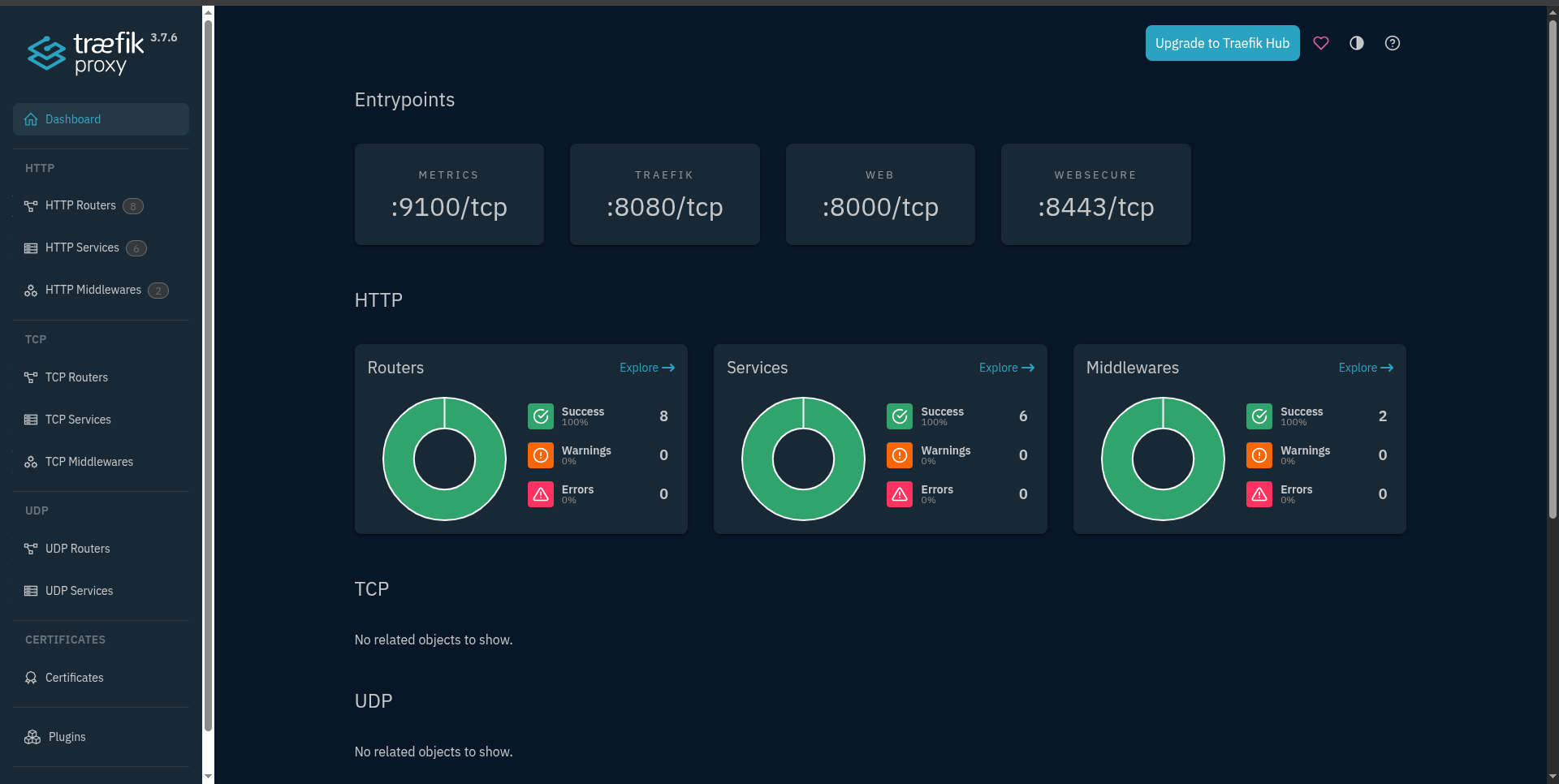
Traefik ships with a built-in dashboard that shows your routers, services, and middleware at a glance.
Using minikube addons open
The easiest way to access the Traefik dashboard from your host machine is:
minikube addons open traefik
This will automatically locate the Traefik dashboard service and open it in your default browser.
Using minikube service
If you are running in a headless environment, or the browser does not open automatically, you can retrieve the service URLs manually:
minikube service traefik -n kube-system
Example output:
┌─────────────┬─────────┬───────────────┬───────────────────────────┐
│  NAMESPACE  │  NAME   │  TARGET PORT  │            URL            │
├─────────────┼─────────┼───────────────┼───────────────────────────┤
│ kube-system │ traefik │ traefik/8080  │ http://192.168.64.3:31918 │
│             │         │ web/80        │ http://192.168.64.3:30455 │
│             │         │ websecure/443 │ http://192.168.64.3:31425 │
└─────────────┴─────────┴───────────────┴───────────────────────────┘
...
The service exposes three endpoints:
- traefik/8080: The Traefik admin dashboard (this is always the first URL).
- web/80: The entrypoint for standard HTTP traffic.
- websecure/443: The entrypoint for secure HTTPS traffic.
Note: You do not need to use the
web/80andwebsecure/443URLs returned by this command. Traefik binds directly to the node’s ports 80 and 443 viahostPort, you can access your applications directly using the minikube IP (e.g.http://$(minikube ip)).
To print only the dashboard URL directly, you can run:
minikube service traefik -n kube-system --url | head -n 1
Example output:
http://192.168.64.3:31918
Usage Example: Deploying an App with Ingress
This example deploys a simple web application and exposes it through Traefik using a standard Kubernetes Ingress resource.
Step 1: Deploy the application
Create the example namespace and deploy a simple echo server:
cat <<'EOF' | kubectl apply -f -
apiVersion: v1
kind: Namespace
metadata:
  name: traefik-example
---
apiVersion: apps/v1
kind: Deployment
metadata:
  name: app
  namespace: traefik-example
  labels:
    app: traefik-app
spec:
  replicas: 1
  selector:
    matchLabels:
      app: traefik-app
  template:
    metadata:
      labels:
        app: traefik-app
    spec:
      containers:
      - name: echo-server
        image: kicbase/echo-server:1.0
        ports:
        - containerPort: 8080
---
apiVersion: v1
kind: Service
metadata:
  name: app
  namespace: traefik-example
spec:
  ports:
  - port: 8080
    targetPort: 8080
  selector:
    app: traefik-app
EOF
Example output:
namespace/traefik-example created
deployment.apps/app created
service/app created
Wait for the deployment to roll out:
kubectl rollout status deployment app -n traefik-example
Example output:
deployment "app" successfully rolled out
Step 2: Create an Ingress
Create an Ingress with both host-based and path-based routing rules so you can test both options:
cat <<'EOF' | kubectl apply -f -
apiVersion: networking.k8s.io/v1
kind: Ingress
metadata:
  name: app
  namespace: traefik-example
spec:
  ingressClassName: traefik
  rules:
  - host: traefik.example
    http:
      paths:
      - path: /
        pathType: Prefix
        backend:
          service:
            name: app
            port:
              number: 8080
  - http:
      paths:
      - path: /app
        pathType: Prefix
        backend:
          service:
            name: app
            port:
              number: 8080
EOF
Example output:
ingress.networking.k8s.io/app created
Step 3: Test the Ingress
Since Traefik is configured to bind to the node’s network interface via hostPort on ports 80/443, you can access the application directly using the minikube IP.
Host-based routing
To test host-based routing, send an HTTP request with the Host header set to traefik.example:
curl -H "Host: traefik.example" http://$(minikube ip)
Example output:
Request served by app-7c5b849f45-vld2k

HTTP/1.1 GET /

Host: traefik.example
Accept: */*
Accept-Encoding: gzip
User-Agent: curl/8.7.1
X-Forwarded-For: 192.168.64.1
X-Forwarded-Host: traefik.example
X-Forwarded-Port: 80
X-Forwarded-Proto: http
X-Forwarded-Server: traefik-59b65cb4f6-zr4d4
X-Real-Ip: 192.168.64.1
Path-based routing
To test path-based routing, send an HTTP request with the /app path:
curl http://$(minikube ip)/app
Example output:
Request served by app-7c5b849f45-kf2l4

HTTP/1.1 GET /app

Host: 192.168.64.3
Accept: */*
Accept-Encoding: gzip
User-Agent: curl/8.7.1
X-Forwarded-For: 192.168.64.1
X-Forwarded-Host: 192.168.64.3
X-Forwarded-Port: 80
X-Forwarded-Proto: http
X-Forwarded-Server: traefik-59b65cb4f6-khztt
X-Real-Ip: 192.168.64.1
Using HTTPS
To test accessing the application securely over HTTPS (which uses Traefik’s default self-signed certificate), send a host-based HTTPS request:
curl --insecure -H "Host: traefik.example" https://$(minikube ip)
Example output:
Request served by app-7c5b849f45-vld2k

HTTP/1.1 GET /

Host: traefik.example
Accept: */*
Accept-Encoding: gzip
User-Agent: curl/8.7.1
X-Forwarded-For: 192.168.64.1
X-Forwarded-Host: traefik.example
X-Forwarded-Port: 443
X-Forwarded-Proto: https
X-Forwarded-Server: traefik-59b65cb4f6-zr4d4
X-Real-Ip: 192.168.64.1
Accessing HTTPS in a browser
When visiting https://$(minikube ip)/app in a browser, you will encounter a certificate warning (such as “Your connection is not private”) because the default certificate is self-signed. You can safely bypass this warning in local development:
- Bypass the warning: Click Advanced and select Proceed to
(unsafe) .
Step 4: Inspecting the Traefik Dashboard
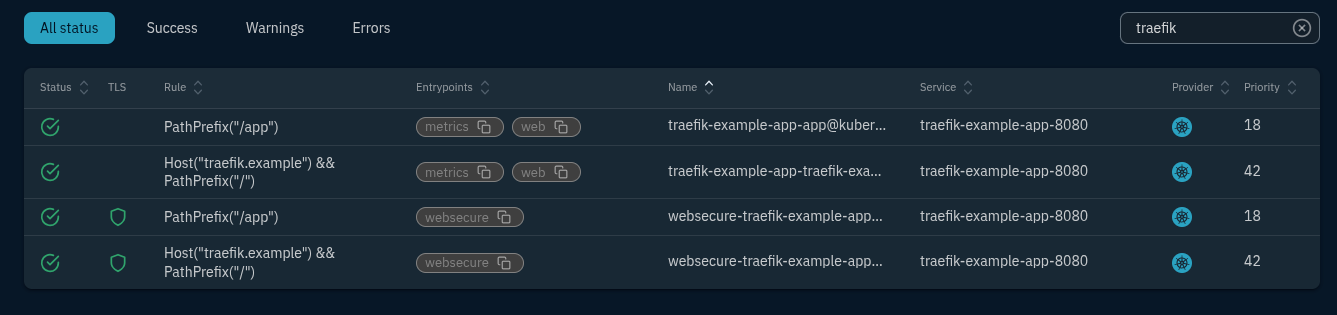
You can inspect the HTTP routers and services created for your application directly in the Traefik dashboard.
To open the dashboard, run:
minikube addons open traefik
HTTP Routers
Traefik automatically creates two HTTP routers for the application: one for the host-based routing rule (traefik.example) and one for the path-based routing rule (/app).
HTTP Services
Traefik routes the traffic to the corresponding Kubernetes Service (app) in the traefik-example namespace.

Step 5: Configuring Custom TLS Certificates (Optional)
By default, Traefik uses a self-signed certificate which causes browsers to show a security warning. To configure a trusted certificate for local development using mkcert:
-
Install and set up local CA:
mkcert -installExample output:
The local CA is now installed in the system trust store! ⚡️
The local CA is now installed in the Firefox trust store (requires browser restart)! 🦊
Warning
Installing the local CA in your system trust store elevates its trust. Keep the root CA private key secure. It is stored at:
- Linux:
~/.local/share/mkcert/rootCA-key.pem - macOS:
~/Library/Application Support/mkcert/rootCA-key.pem - Windows:
%LocalAppData%\mkcert\rootCA-key.pem
If this key is compromised or leaked, an attacker could mint trusted certificates for any domain, enabling local machine-in-the-middle (MITM) attacks.
- Linux:
-
Generate certificate:
mkcert traefik.exampleExample output:
Created a new certificate valid for the following names 📜 - "traefik.example" The certificate is at "./traefik.example.pem" and the key at "./traefik.example-key.pem" ✅ It will expire on 16 October 2028 🗓 -
Create secret:
kubectl create secret tls app-tls -n traefik-example \
    --cert=traefik.example.pem --key=traefik.example-key.pem
Example output:
secret/app-tls created -
Update Ingress: Patch your Ingress resource to add the
tlsconfiguration:kubectl patch ingress app -n traefik-example --type=merge \ -p '{"spec":{"tls":[{"hosts":["traefik.example"],"secretName":"app-tls"}]}}'Example output:
ingress.networking.k8s.io/app patched -
Configure DNS: Map the hostname to your minikube IP in
/etc/hosts:echo "$(minikube ip) traefik.example" | sudo tee -a /etc/hosts
You can now visit https://traefik.example directly in your browser with a fully trusted connection.
Step 6: Cleaning up
Remove the example application by deleting the namespace:
kubectl delete namespace traefik-example
Migrating from the Ingress (nginx) Addon
Warning
The default ingress (nginx) addon is unmaintained, and minikube recommends using the traefik addon instead.
Note that the ingress addon and the traefik addon cannot be enabled at the same time because both bind to ports 80 and 443. Make sure to disable the ingress addon before enabling traefik:
minikube addons disable ingress
minikube addons enable traefik
If you are migrating existing applications from the default ingress (nginx) addon to the traefik addon:
-
Update the Ingress Class: if your existing Ingress resources explicitly define
ingressClassName: nginx, update them toingressClassName: traefikor remove theingressClassNamefield entirely. When the field is omitted, Traefik will automatically handle the Ingress because the Traefik addon registers itself as the default IngressClass (ingressClass.isDefaultClass=true). -
Replace Nginx-Specific Annotations: annotations prefixed with
nginx.ingress.kubernetes.io/(such as rewrite targets, custom headers, or SSL redirection settings) are ignored by Traefik. For basic routing, these annotations can often be removed. For advanced routing or middleware features, define Traefik Middlewares or use Traefik-specific annotations.
Disabling the Addon
minikube addons disable traefik
This runs helm uninstall traefik -n kube-system inside the node and removes all Traefik resources.
Troubleshooting
Check that the Traefik pod is running:
kubectl get pods -n kube-system -l app.kubernetes.io/name=traefik
Example output:
NAME                       READY   STATUS    RESTARTS   AGE
traefik-6b5d4cb8f7-x9z2k   1/1     Running   0          2m
Check the Traefik service:
kubectl get svc -n kube-system -l app.kubernetes.io/name=traefik
Example output:
NAME      TYPE           CLUSTER-IP     EXTERNAL-IP   PORT(S)                                     AGE
traefik   LoadBalancer   10.96.123.45   <pending>     8080:31808/TCP,80:31080/TCP,443:31443/TCP   2m
Further Reading
- Traefik Documentation
- Traefik Helm Chart
- Traefik Kubernetes Ingress
- Traefik IngressRoute CRD
- Traefik Dashboard
Feedback
Was this page helpful?
Glad to hear it! Please tell us how we can improve.
Sorry to hear that. Please tell us how we can improve.